How to Create SEO-Optimized Watch Pages for Google
What is an SEO Watch Page?
An SEO watch page is a dedicated, distraction-free URL where a video serves as the 'hero' or main content. By placing your video prominently above the fold and supporting it with VideoObject schema, you directly satisfy Google's primary indexing requirements, significantly increasing your chances of ranking in video rich snippets and generative search results.
The Rise of Dedicated Watch Pages in SEO
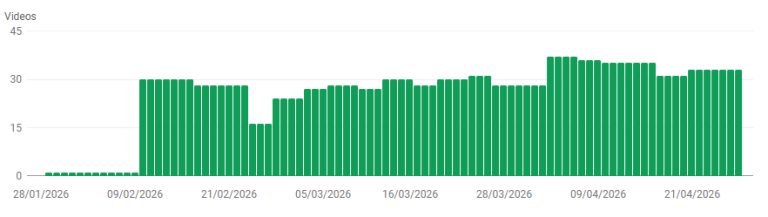
In recent years, Google's video indexing requirements have fundamentally shifted. Google Search Console now heavily emphasizes whether a video is the "main content of the page." If your video is simply supplementary content buried within a long-form article, Google is unlikely to index it as a video result. This is where dedicated watch pages come into play.

A watch page is a specific URL designed with a single primary purpose: hosting and displaying a video. By structuring your site to include dedicated watch pages, you signal to Google that the video is the hero content, vastly improving your chances of securing highly visible video rich snippets in the SERPs.
To dive deeper into advanced video strategies, check out our comprehensive Video SEO Schema Best Practices for 2026.
The SEO Benefits of Creating Watch Pages
Transitioning to a watch page architecture for your core video assets yields several powerful SEO benefits:
- Guaranteed Video Indexing: Google explicitly states that videos must be the primary content to be indexed. Watch pages satisfy this requirement natively.
- Enhanced Rich Snippets: When Google confidently understands the video is the main asset, it is far more likely to display a large video thumbnail and key moments in the search results.
- Targeted Keyword Ranking: A dedicated page allows you to optimize the URL, H1, and meta tags specifically for the video's core topic, reducing keyword cannibalization with your broader informational pages.
- Better User Engagement: Users searching for "how-to videos" or "webinars" expect immediate video playback. Delivering them to a distraction-free watch page improves dwell time and reduces bounce rates.

Visibility in Generative Search
Modern AI search engines prioritize pages where content hierarchy is unambiguous. By utilizing watch pages, you provide AI crawlers with a clear entity-signal, making it easier for them to cite your video as a primary source for specific search queries, bypassing the clutter of non-video-specific pages.
Step 1: Optimal Video Position on the Page
To get a page recognized as a watch page, the video's physical placement in the DOM and viewport is crucial. Google's rendering engine evaluates the layout to determine the video's prominence.
- Above the Fold: The video player must be the most prominent element visible immediately upon page load, without requiring the user to scroll.
- Appropriate Sizing: The video player should take up a significant portion of the viewport. Avoid embedding tiny video players (e.g., smaller than 400x300 pixels).
- Avoid Hidden Elements: Never hide the video behind tabs, accordions, or "click to load" overlays that prevent Googlebot from seeing the initial iframe or video tag.
- Surrounding Context: Place the H1 immediately above or below the video. Ensure the primary call-to-action focuses on playing the video.
Step 2: Implementing Perfect VideoObject Schema
While visual prominence is critical for rendering, raw code tells the definitive story. Injecting strict, valid VideoObject JSON-LD schema is non-negotiable for an SEO watch page.
Here is a breakdown of the critical properties you must include:
| Property | Status | SEO Description |
|---|---|---|
@type |
Required | Must be declared strictly as VideoObject. |
name |
Required | The exact title of the video (matches H1). |
description |
Required | A comprehensive summary of the video content. |
thumbnailUrl |
Required | High-resolution image (16:9 aspect ratio). |
uploadDate |
Required | ISO 8601 formatted date (e.g., 2026-04-28T08:00:00Z). |
contentUrl |
Recommended | Direct link to the .mp4 or actual media file. |
embedUrl |
Recommended | The URL pointing to the player iframe if contentUrl is unavailable. |
hasPart |
Optional | Used for defining 'Key Moments' or clip timestamps. |
Step 3: Textual Support and Transcripts
Even though the video is the main event, Googlebot still relies heavily on text to understand topical relevance. A robust watch page should feature optimized supplementary text.
Include a full, accurate transcript directly below the video player. This not only makes the page accessible (ADA compliant) but provides Google with rich, keyword-dense content that perfectly aligns with the video's audio track. Additionally, provide a bulleted list of timestamps (Key Moments) within the body content and replicate these in your hasPart schema property.
Step 4: Submission and Sitemaps
Once your watch page is live, ensure Google discovers it quickly.
Create a dedicated Video XML Sitemap. This sitemap should specifically list the URLs of your watch pages, along with their associated video titles, descriptions, and thumbnail URLs. Submit this sitemap directly through Google Search Console. Monitor the 'Video Pages' indexing report in GSC to ensure Google is successfully crawling the page, detecting the prominent video position, and formally categorizing the URL as a watch page.
Cluster Hub
This article is part of our structured data and schema cluster. Read the full pillar guide: Why Schema Markup Is More Important Than Ever in 2026.